Best 3D Tree Generators for Games in 2026: FoliMesh vs SpeedTree, The Grove, Blender and AI
An honest, hands-on comparison of tree generators for games — procedural, Blender add-ons and AI text/image-to-3D. Real triangle budgets per LOD, what each tool really exports, and how to pick one for Unity, Unreal, Godot or the web.
Every outdoor game lives or dies by its vegetation. A castle can be perfect, but if every tree around it has the same trunk, the same branch angles and the same crown, the world looks fake in seconds. Modelling trees by hand gives you control, but a forest needs hundreds of variations — and each of them has to stay cheap a hundred metres from the camera.
That is what tree generators are for. In this guide we compare the main options in 2026 — FoliMesh, SpeedTree, The Grove, Blender Sapling, Geometry Nodes, asset libraries and AI text/image-to-3D tools such as Tripo — on the things that actually matter in a game: levels of detail, triangle budgets, leaves, wind, collision, pivots, engine export and price model.
Full disclosure: FoliMesh is our tool. We built it for our own game, so we know exactly where it is strong — and we will also tell you when another tool is the better choice.
TL;DR
- FoliMesh — a browser-based procedural generator built for games: you set a triangle budget for every LOD, and you get a game-ready model with LOD0–LOD3, an impostor, collision, wind data and a pivot at the root, exported as GLB, FBX, OBJ or a ready package for Unity, Unreal Engine or Godot. 10 visual styles, seasons and states (stump, log, snag…) from one generator. No install, no subscription required.
- SpeedTree — the industry standard for large studios: deep, powerful, with its own runtime and the steepest learning curve.
- The Grove — growth simulation for Blender and Houdini: beautiful, botanically believable trees for archviz and film; game optimisation is on you.
- Blender Sapling and Geometry Nodes — free and flexible, but LODs, leaf cards, collision and wind are manual work.
- AI text/image-to-3D (Tripo, Meshy and others) — great for one unusual hero tree or a concept. By the vendors' own description, the result still needs LODs, leaf cards, collision, pivot and wind before it is game-ready.
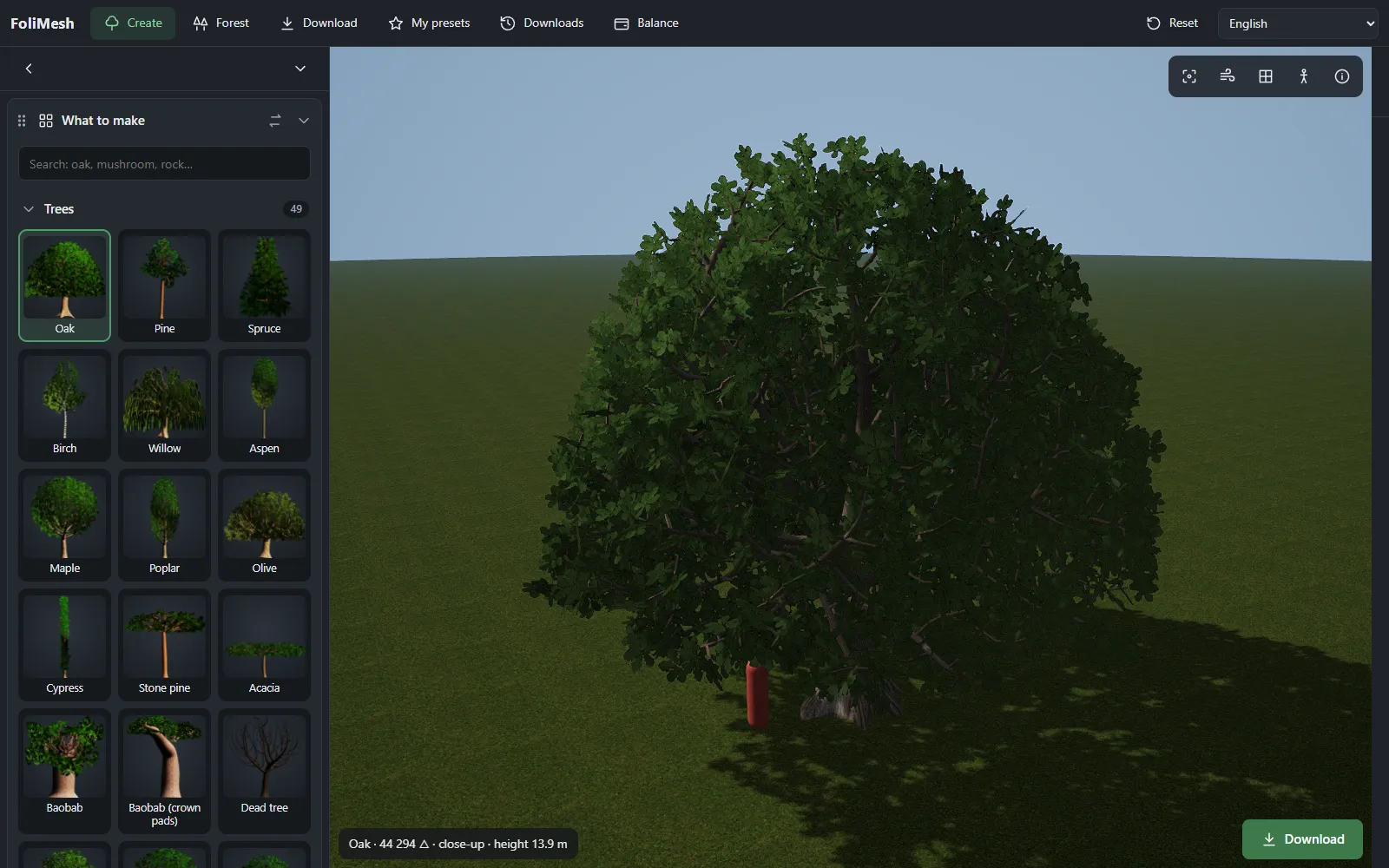 The FoliMesh editor in the browser: a library of presets on the left, the live 3D model on the right, the triangle count and height at the bottom.
What a tree generator actually has to do for a game
A tree that looks good in a render is not automatically a game asset. Before you put it into Unity, Unreal or Godot, it needs:
- A chain of LODs with a predictable triangle count at each distance — and the same silhouette, so the switch is invisible.
- Efficient leaves. Individually modelled leaves explode the triangle count; huge transparent cards explode overdraw. You need clusters that fill their cards well.
- Wind data — trunk still, big branches slow, leaf tips fast — stored where your shader can read it.
- Collision — a simple shape for the trunk, not the whole crown.
- A pivot at the base of the trunk, real-world scale and clean normals.
- Variation — new trees of the same species that are not copies.
- An export your engine understands, ideally without an hour of import settings.
Keep this list in mind: it is the honest test for every tool below.
How procedural tree generators work
Under the hood, almost every tree generator answers the same question: where does the next branch grow? There are three classic answers.
L-systems. A Lindenmayer system starts from a single symbol — the trunk — and repeatedly rewrites it with grammar rules: “grow forward, turn, split into two”. A few rules give surprisingly natural branching, and changing the rules gives a different species. Most artist-facing tools hide the grammar behind sliders.
Space colonisation. The crown is first filled with attraction points; branches grow towards the nearest free points until the space is “colonised”. This produces crowns that fill a given volume naturally — handy when you need a tree to match a silhouette.
Parametric and growth models. Each branch level has parameters — length, angle, curvature, how many children it spawns and where. Growth simulators such as The Grove add light, shade and gravity over several simulated seasons, so trees lean towards the light and drop shaded branches.
On top of the skeleton, a generator still has to do the work a game cares about: turn branches into a mesh with the right number of rings and segments, place leaves, bake textures, build LODs and export. That second half is where tools differ the most — and where most of the time goes in production.
How FoliMesh does it. Each species is a set of growth rules for trunk, branch levels and leaves, with its own bark and foliage. The skeleton grows with its own fixed step, independent of polygon detail. Only after that does the mesher decide how many rings and segments each branch gets and how many leaf clusters the crown keeps — and it chooses those numbers by a binary search over an analytic triangle counter until the result fits your budget. That is why changing a budget never changes the shape of the tree, only how heavy it is.
Comparison at a glance
| FoliMesh | SpeedTree | The Grove | Sapling / Geometry Nodes | AI text/image-to-3D | |
|---|---|---|---|---|---|
| Where it runs | Browser, nothing to install | Desktop app | Blender, Houdini add-on | Blender | Web / API |
| How you control it | Presets, sliders, triangle budgets, text | Procedural generators + hand editing | Growth simulation | Parameters / node graphs | Text prompt or reference image |
| LOD chain | Automatic LOD0–LOD3 + impostor, budget per LOD | Yes, deep control | Manual / extra steps | Manual | Not included — manual |
| Triangle budget per LOD | Yes, separately for bark and leaves | Via LOD settings | No | No | Retopology tools, no LOD chain |
| Leaves | Clustered cards with fill and overdraw control | Leaf meshes, atlases, cutouts | Twig assets | Manual | Often a solid mass — rebuild needed |
| Wind data | Built in (vertex data + engine shaders) | Yes, own wind system | Yes | Manual | Not included |
| Collision and pivot | Built in | Yes | Manual | Manual | Not included |
| Engine packages | Unity, Unreal, Godot; GLB for three.js, Babylon.js, PlayCanvas, Bevy | Unity, Unreal, own format | Via FBX/GLB from Blender | Via FBX/GLB from Blender | GLB / FBX / OBJ |
| Styles | 10 (realistic, low-poly, voxel, pixel, anime, hand-painted, toon, PS1, palette, mobile/VR) | Mostly realistic | Realistic | Any — if you build it | Depends on the model |
| Seasons and states | Spring–winter; stump, fallen, log, snag, root plate, brushwood | Seasons via species setup | Through growth | Manual | Regenerate |
| Whole forests | Biome scatter, GLB with GPU instancing + points | Via engine tools | Via Blender | Via Geometry Nodes | No |
| Same input = same tree | Yes (seed) | Yes | Yes | Yes | No |
| Price model | Free downloads to start, packs, optional subscription | Subscription | One-time licence | Free | Credits / subscription |
Prices change often, so check each vendor's current page before you buy.
FoliMesh — a generator built around game budgets
FoliMesh started as an in-house tool for Alardon Online, our medieval online game with battles of up to 5,000 warriors per side. A game like that has to draw thousands of soldiers and the forest around them in every frame, so we wrote a generator with one rule: every tree is built for a budget. (The story of how FoliMesh was born.)
Budgets instead of guesswork
Most tools make you build a tree and then reduce it. FoliMesh works the other way round: you set how many triangles the bark and the leaves may use on each level of detail, and the generator finds the right detail on its own. Here is a real oak from the editor:
| Level | Triangles | Bark: used / budget | Leaves: used / budget |
|---|---|---|---|
| Close-up | 44,294 | 20,000 / 20,000 | 24,294 / 27,000 |
| LOD0 | 14,490 | 990 / 1,000 | 13,500 / 13,500 |
| LOD1 | 3,984 | 288 / 300 | 3,696 / 3,700 |
| LOD2 | 1,154 | 56 / 60 | 1,098 / 1,100 |
| Impostor | 2 | — | — |
The whole tree, with every level, was generated in 532 ms in the browser (WebGPU). Platform presets — Mobile, PC and consoles, Close-up — set sensible budgets in one click.
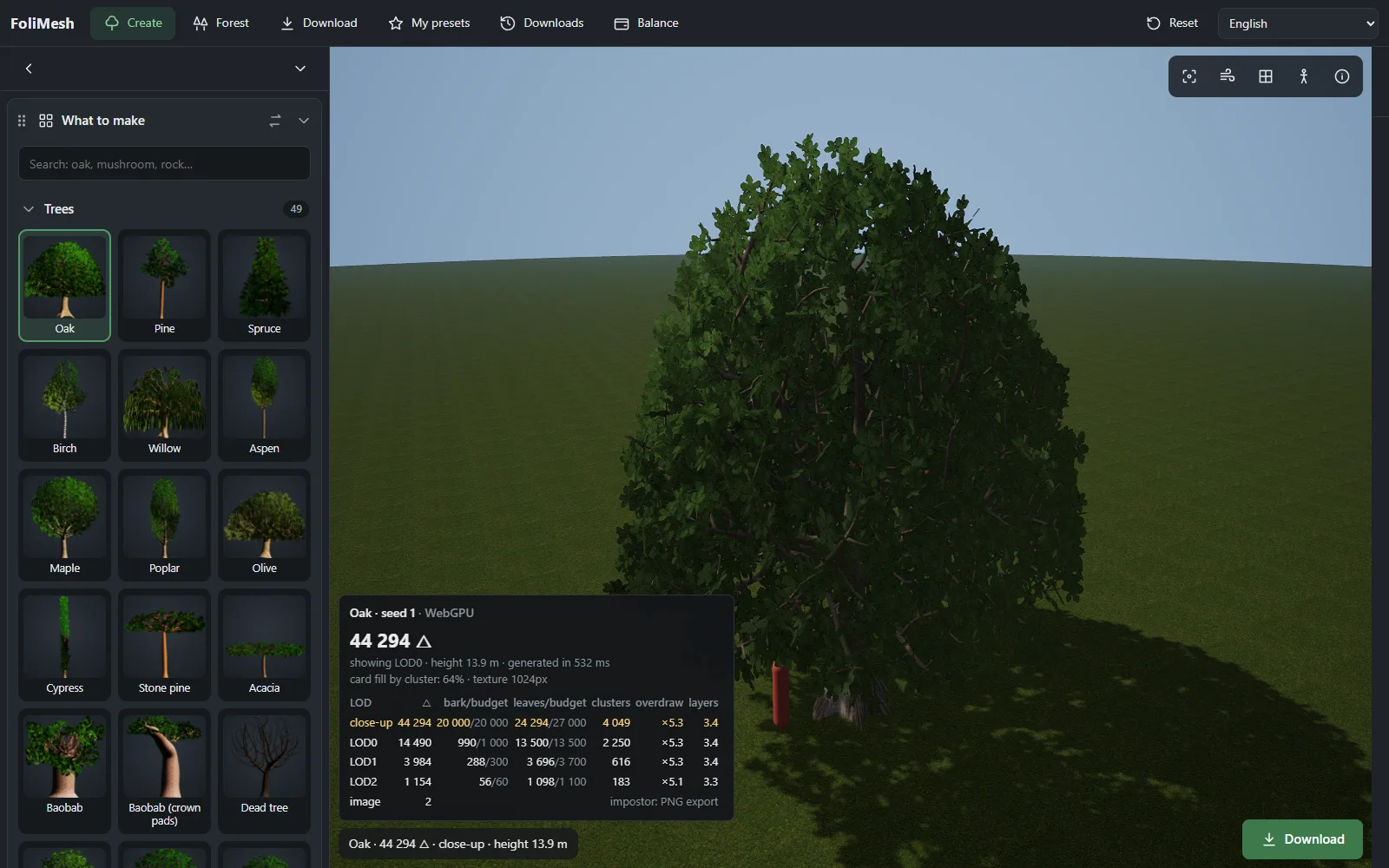 The “triangles per LOD” panel: actual count against the budget for bark and leaves, leaf clusters, overdraw and layers.
The same tree on every level
Shape and polygons are separated: the skeleton grows once, and rings and segments are only stretched over the finished curve. That is why LOD2 has the same silhouette as LOD0 — it is simply lighter. Distant levels drop inner leaf clusters first and grow the remaining ones while keeping their area, so the tone and density of the crown do not “pop” when the engine switches levels.
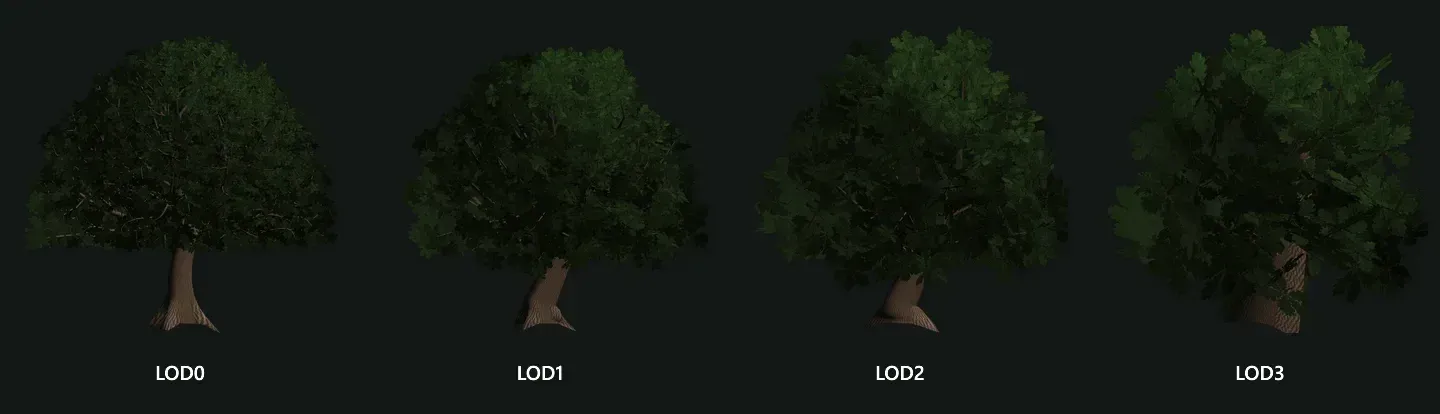 One oak, four levels of detail: the silhouette and crown density stay the same.
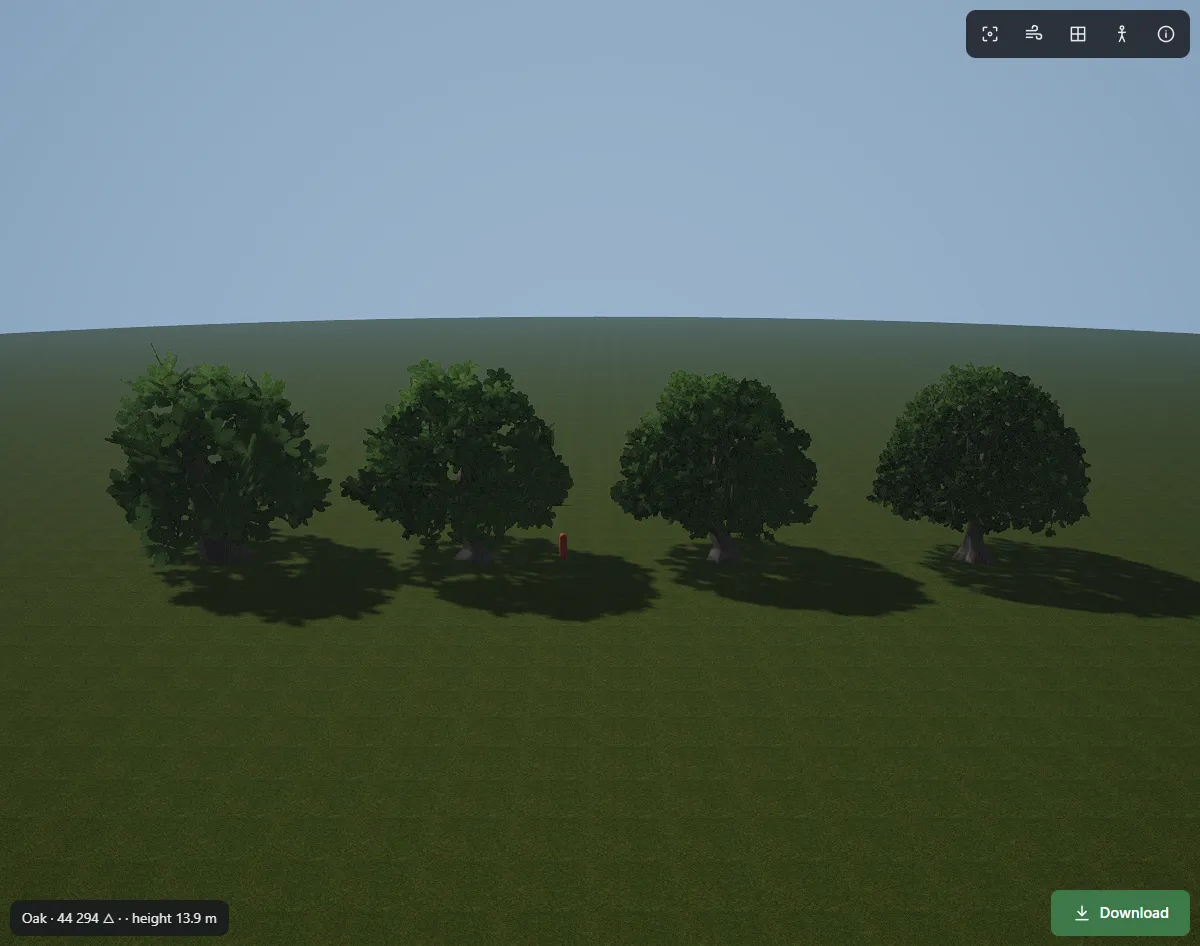 The “All side by side” view: every level in one scene, under the same light.
Game data is part of the model
- Wind is baked into vertex data (trunk 0, thick branches about 0.3, leaf tips 1.0), and the engine packages ship wind shaders that read it.
- Collision is generated as a simple shape around the trunk.
- The pivot sits at the centre of the trunk base, at real-world scale.
- Variation: each seed gives a new tree of the same species; the same seed always gives the same tree.
Export that just works
- Unity — FBX with
_LOD0…_LOD3nodes, so Unity builds the LOD Group on import, plus an importer and wind shaders for the Built-in pipeline and URP. - Unreal Engine — FBX with a LOD group and
UCX_collision, plus an import script. - Godot 4 — GLB plus a ready
.tscnscene: LODs through visibility ranges, wind and aStaticBody3Dcollision inside. - The web and Rust — GLB for three.js, Babylon.js, PlayCanvas and Bevy.
- Also: OBJ, MagicaVoxel
.voxfor the voxel style, sprite sheets for 2D games, and impostor images for the far distance.
One generator, ten styles, every season
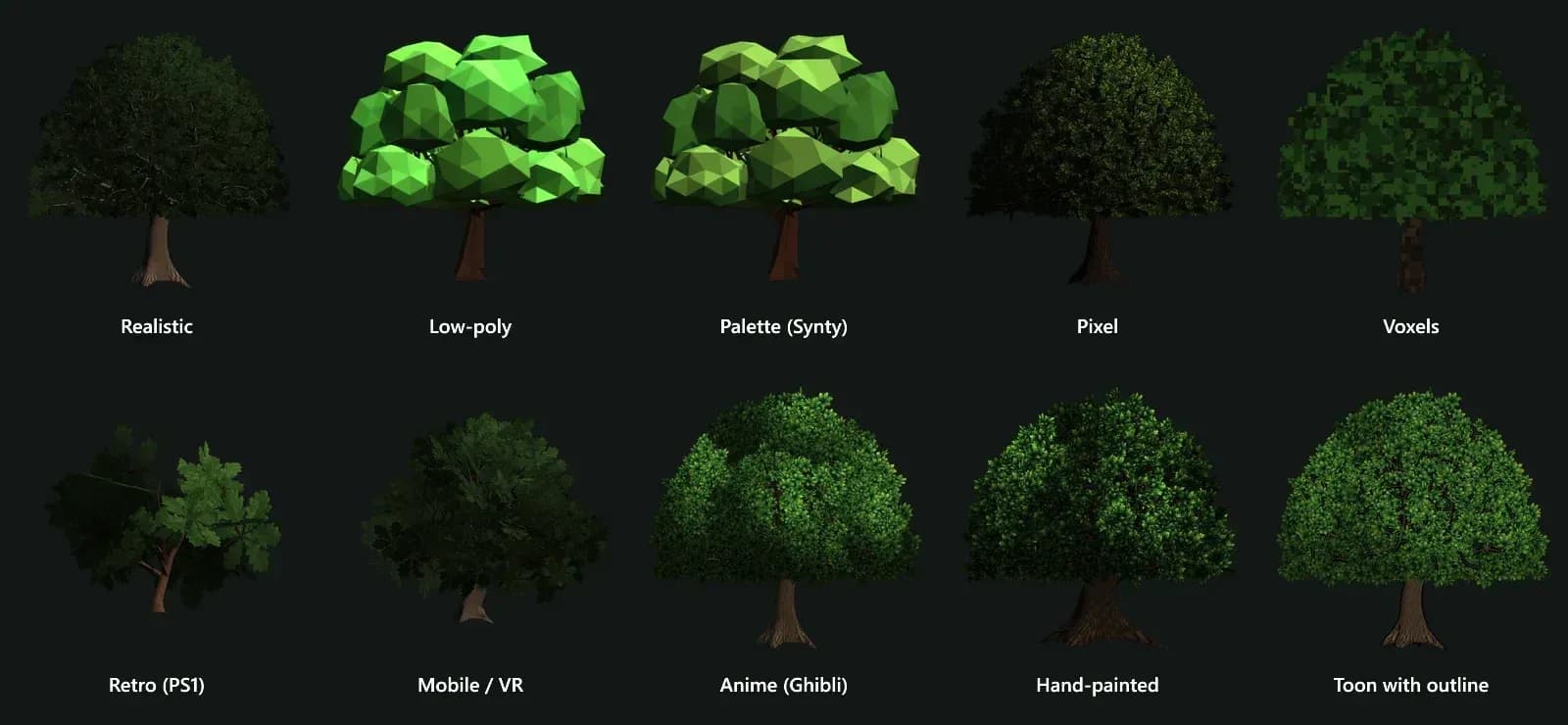
The same oak — and every other species — can be built in ten visual styles: realistic, low-poly, palette (Synty-like), pixel, voxels, PS1 retro, mobile/VR, anime (Ghibli-like), hand-painted and toon with outline.
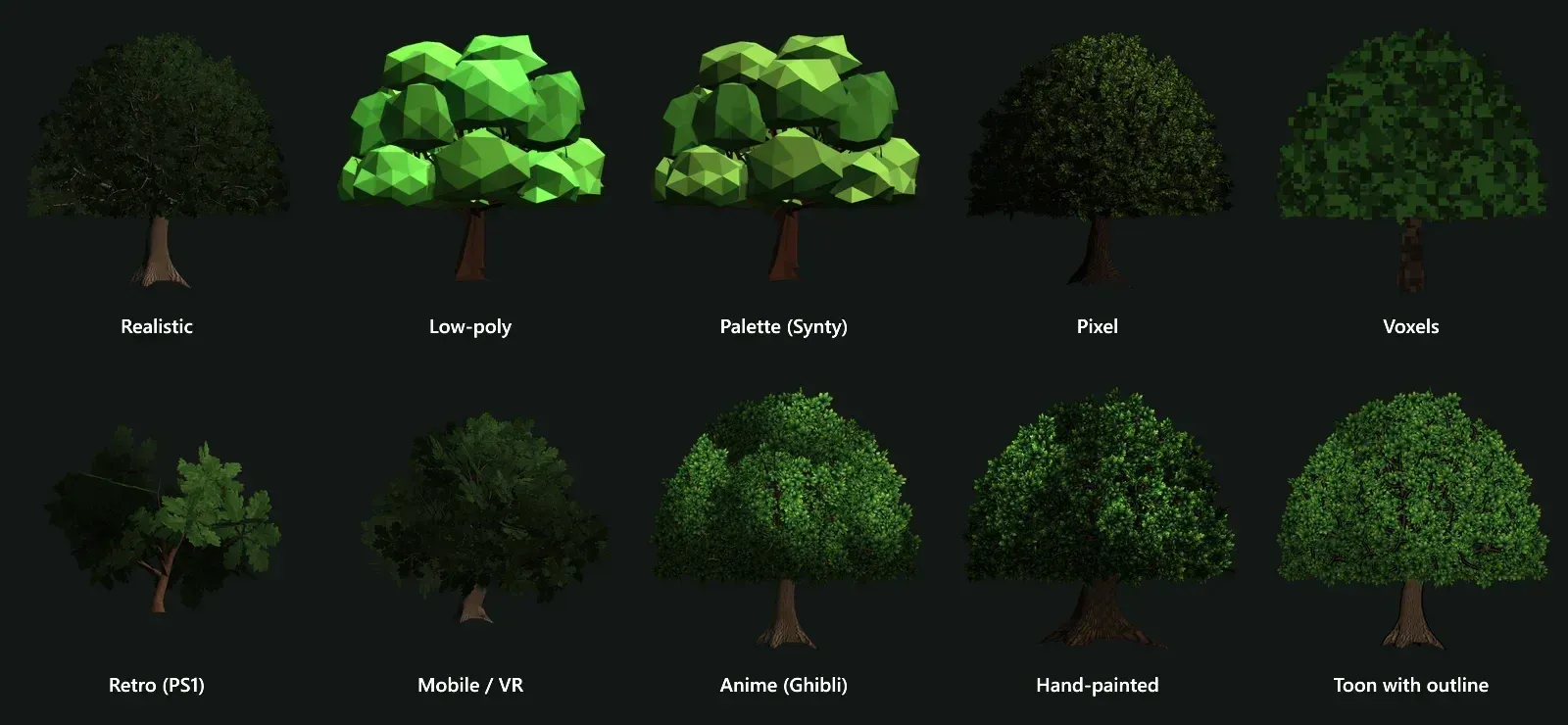 One oak, ten styles: realistic, low-poly, palette, pixel, voxels, PS1, mobile/VR, anime, hand-painted and toon.
Seasons and states are part of the same generator, so a whole biome stays consistent:
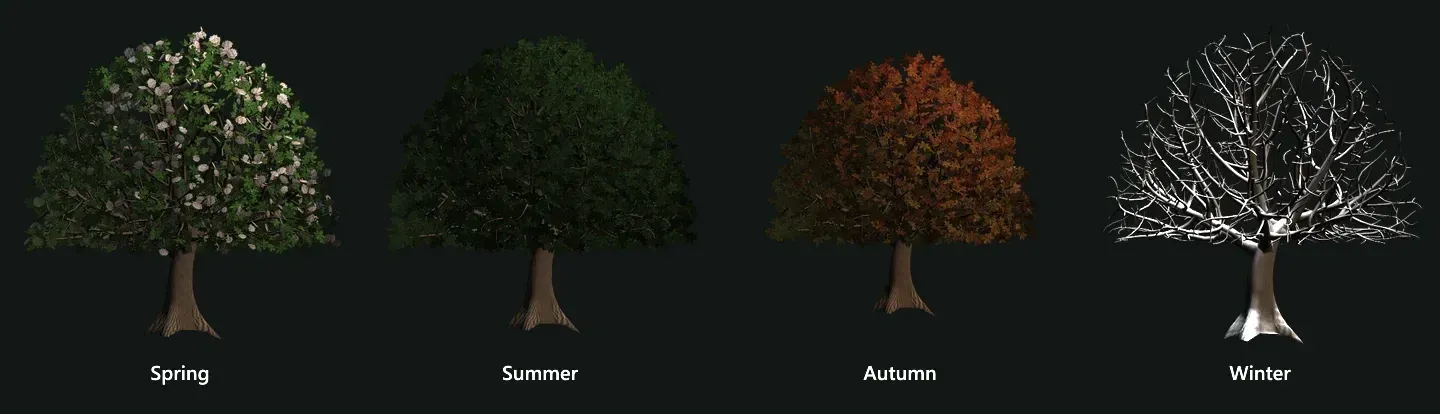 Seasons: blossom in spring, full crown in summer, autumn colours, bare branches with snow in winter.
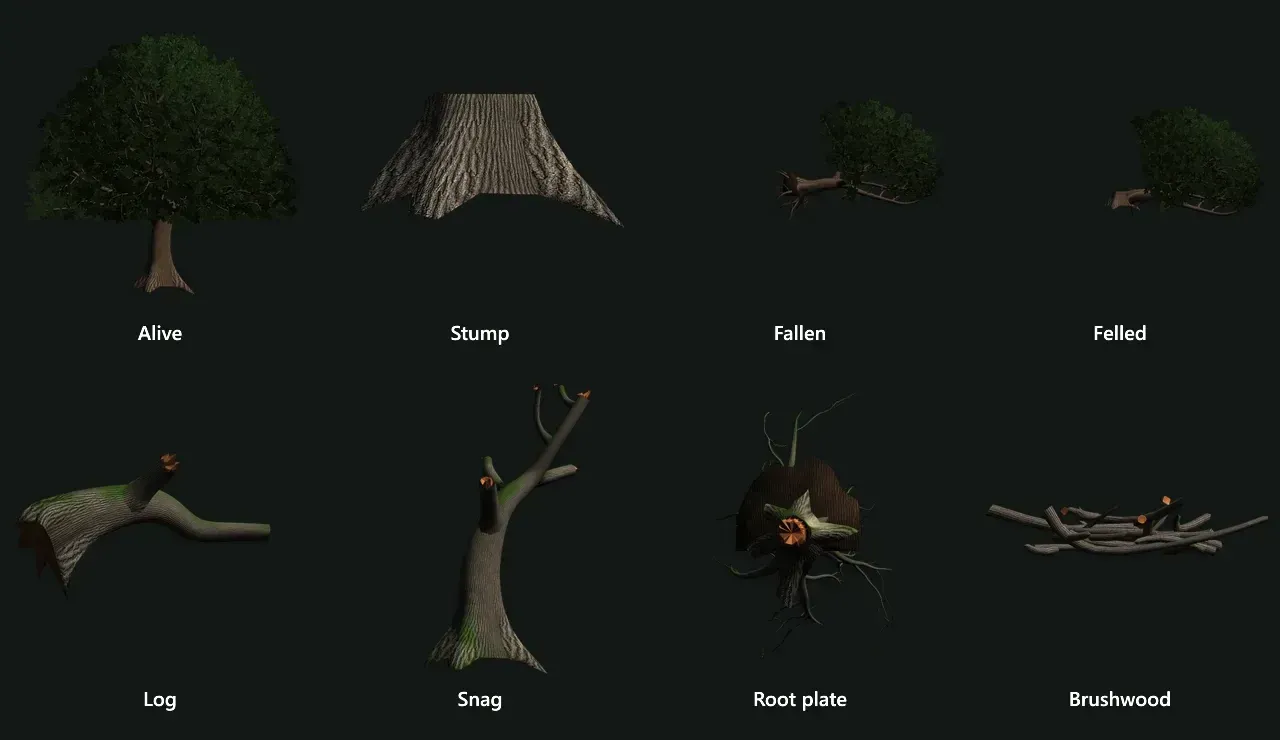 States: alive, stump, fallen, felled, log, snag, root plate and brushwood — everything a forest floor and a lumber mechanic need.
Not only oaks
The generator covers dozens of tree species — from pine, birch and willow to baobab, sakura, sequoia, ginkgo and dragon tree — plus palms, cacti and succulents, shrubs and bamboo, grasses and ferns, vines, crops and flowers, mushrooms and deadwood, rocks and cliffs, caves and crystals, and underwater plants.
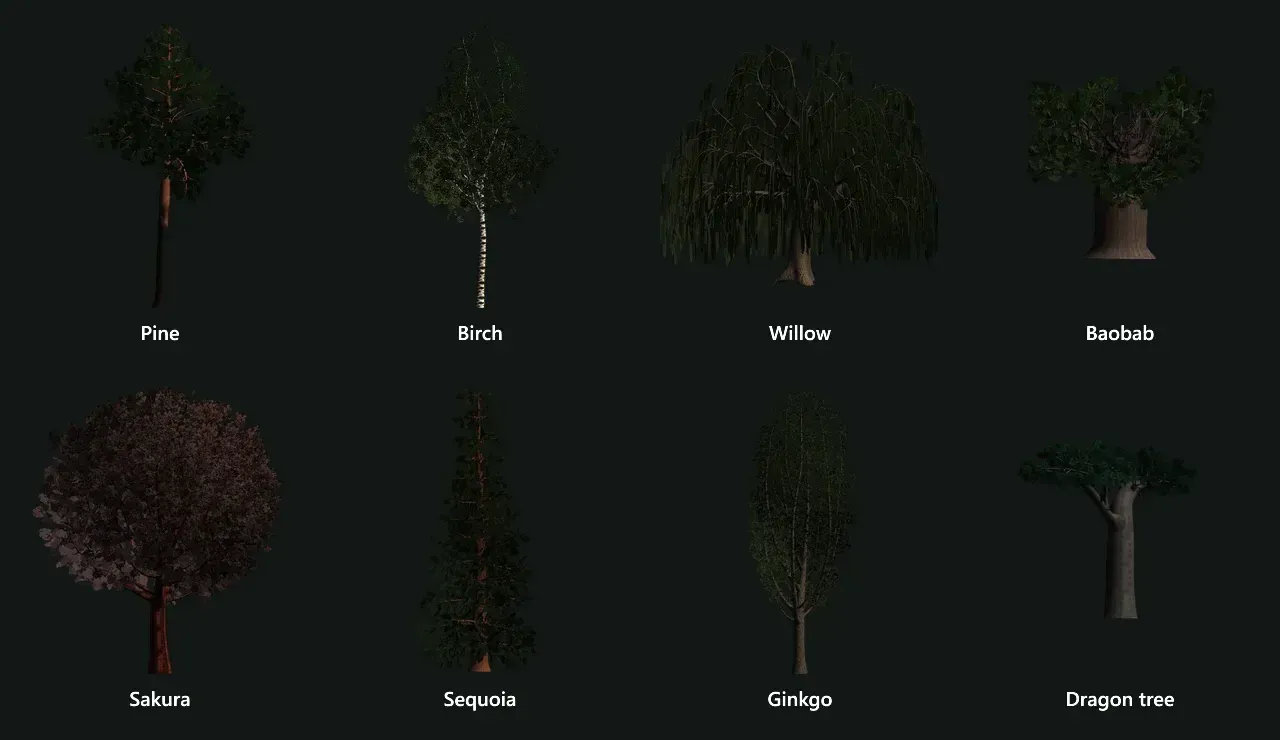 A few of the tree species: every one has its own branching rules, bark and leaves.
Whole forests in one export
Forest mode fills a plot by biome rules — taiga, deciduous forest, tropics, desert, swamp, savanna — with trees, undergrowth, grass and rocks in the current style and season. A 60 × 60 m deciduous plot came out at 824 plants and about 574,000 triangles in just 46 meshes, because identical models are exported once and placed as GPU instances (EXT_mesh_gpu_instancing) with a JSON list of points for your own scatter system.
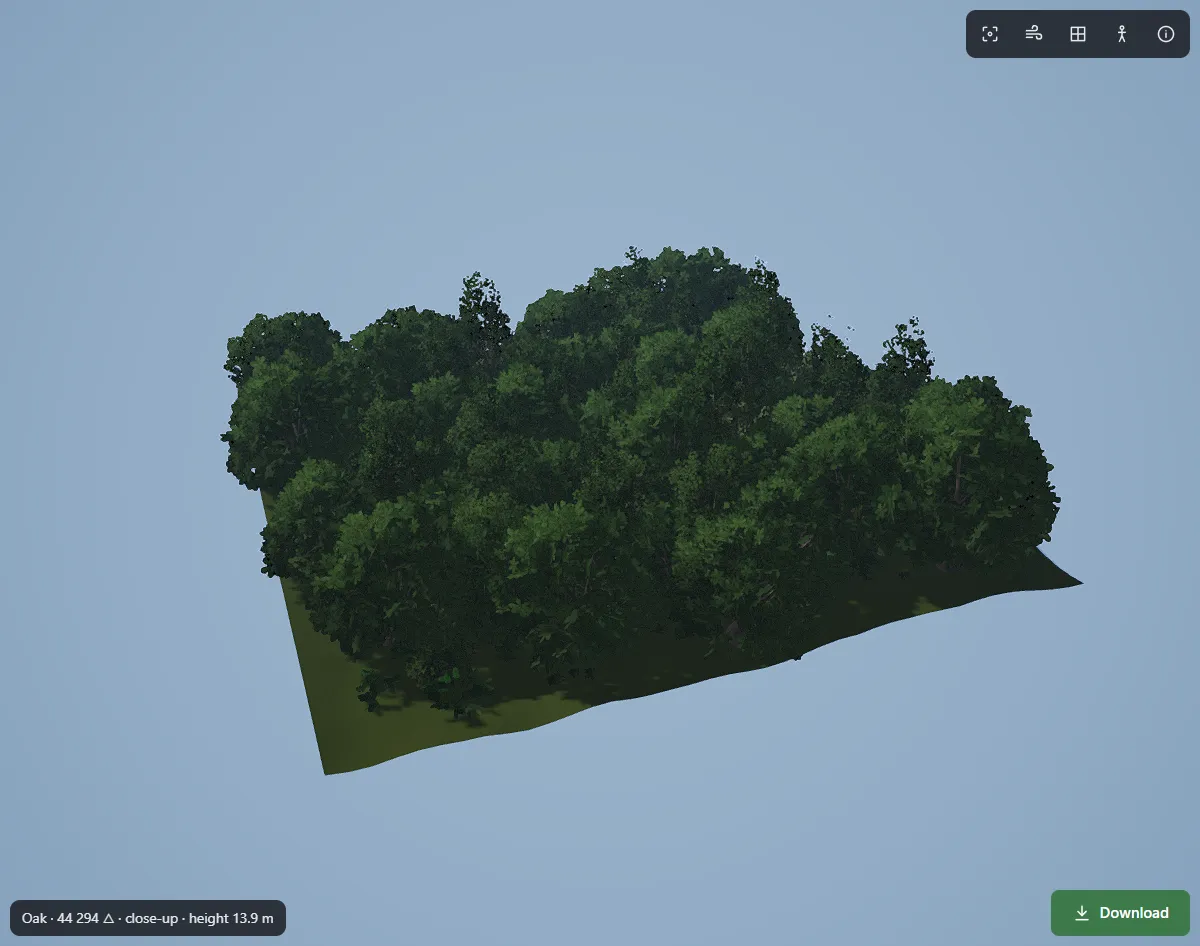 A 60 m deciduous plot: 824 plants, 46 meshes thanks to GPU instancing.
AI where it helps
In FoliMesh, AI does not invent geometry. It turns your words into generator settings, and the mesh is always built by the procedural core — so it stays predictable, reproducible and inside your budget. The same tools are available to AI assistants through MCP. (Why we chose this approach: we generate trees with math, not neural meshes.)
Where FoliMesh is not the best choice
- You need a hand-sculpted, one-of-a-kind hero tree that follows concept art branch by branch — a manual workflow or SpeedTree's hand-editing tools give more direct control.
- Your studio already has a SpeedTree pipeline with hundreds of tuned species — switching rarely pays off.
- You render film-quality botanical growth for archviz — The Grove's growth simulation is made for that.
Status
The browser editor shown in the screenshots is moving to folimesh.com right now. Ready models are already available in the catalog — every one with LOD0–LOD3, collision and a pivot — with free downloads for new accounts and simple pricing.
Step by step: a game-ready tree in FoliMesh
- Pick what to make. Choose a species from the library — or search “oak”, “mushroom”, “rock”.
- Pick a style. Realistic for PBR games, low-poly for mobile and stylised games, voxels or pixel art for retro looks, anime or hand-painted for stylised worlds.
- Pick a season and a state. Summer by default; spring blossom, autumn colours or winter branches. For a forest floor or a lumber mechanic switch to stump, fallen tree, log, snag, root plate or brushwood.
- Set the platform. Mobile, PC and consoles, or close-up. The preset fills sensible triangle budgets for every LOD; you can fine-tune bark and leaves separately.
- Roll variations. Each new seed is a new tree of the same species. Keep three or four seeds per species and your forest will never look copy-pasted.
- Check every level. Switch to “All side by side” and the triangles-per-LOD panel. Make sure LOD2 still reads as the same tree at the distance it will be used.
- Download. One GLB/FBX/OBJ, or a package for Unity, Unreal Engine or Godot with LODs, collision and wind already wired.
- Drop it into the engine and test it with the real number of instances, not one tree on an empty map.
The whole loop takes minutes, not days — and if the art direction changes, you change a parameter and export again instead of remodelling.
SpeedTree — the industry standard
SpeedTree is the most established vegetation tool in the industry and has shipped in a long list of AAA games. Its Modeler combines procedural generators with hand editing: you can grow a trunk and branches procedurally, then prune and reshape them by hand, build several related variations, wind, LODs, leaf atlases and billboards, and export to DCC tools and game engines. Unity and Unreal both have dedicated SpeedTree support.
Choose SpeedTree if you are a studio with a large vegetation pipeline, technical artists who will master its generator graph, and a budget for a subscription. Think twice if you need a few dozen trees for a small game: the learning curve and the cost can be more than the job needs.
The Grove — growth simulation for Blender and Houdini
The Grove grows trees instead of assembling them: repeated growth cycles react to light, shade, gravity, pruning and branch weight. The result has the natural asymmetry of a real tree — it leans to the light, loses shaded branches, develops a heavy side.
Choose The Grove if you work in Blender or Houdini and botanical believability matters more than speed — archviz, animation, film. For games, plan extra steps: geometry reduction, leaf cards, atlases, LODs, collision, pivots and wind are largely your job.
Blender Sapling and Geometry Nodes — free and flexible
Sapling Tree Gen is a free Blender add-on (Add → Curve) that builds trees from branching parameters and presets. It is a quick way to get a first procedural tree, a stylised prop or a background tree. The catch is clean-up: dense branch curves and separate leaf geometry usually need conversion, decimation, leaf cards, UVs and hand-made LODs before export.
Geometry Nodes lets you build your own tree system from curves, instances and attributes — branches with varying thickness, twig instancing, leaves by branch level, damage, LOD switches. It is endlessly flexible, but the generator itself becomes a project you have to design, debug and maintain.
Choose them if you have time, Blender skills and a zero budget. Expect to do LODs, leaves, wind and collision yourself.
Asset libraries (Botaniq and others)
Libraries such as Botaniq give you ready vegetation to place in Blender. They are fast when the species you need already exists. They are not generators: you are limited to what is in the library, and assets made for rendering may still need optimisation for games.
AI text/image-to-3D — Tripo, Meshy and others
AI generators turn a text prompt or a reference image into a textured 3D model in seconds or minutes. That is genuinely useful for one unusual hero tree, a fantasy species or a quick concept.
For a forest, the limits are important — and the vendors are open about them. Tripo's own guide to tree generators notes that its mesh optimisation does not automatically provide the LOD chain, leaf cards, collision, pivot or wind data a game needs, that AI-generated leaves can come out as solid masses rather than efficient foliage cards, and that a single image cannot fully define the hidden back of a tree. Neural meshes also differ every time you generate, so a family of consistent variations is hard to get.
Choose AI if you need a starting mesh for a one-off hero asset and you are ready to retopologise, rebuild the foliage and set up LODs by hand. For production forests, a procedural generator remains the faster path.
Procedural, hand-made or AI: which approach fits your project?
| Factor | Procedural generator | Hand modelling | AI generation |
|---|---|---|---|
| Time to the first tree | Seconds (FoliMesh) to hours | Hours to days | Seconds to minutes |
| Variation | Unlimited, by seed | Manual | Different every time |
| Consistency across a forest | High | Depends on the artist | Low |
| Control | Rules, budgets, presets | Total | Prompt / reference |
| Game-ready output | Depends on the tool — built in for FoliMesh | Depends on the artist | Needs LOD, leaves, wind, collision |
| Best for | Forests, biomes, many species | Unique hero trees | Concepts and fantasy one-offs |
Many projects mix approaches: a procedural generator for the forest, hand work for the two or three trees the player stares at, and AI to explore an unusual silhouette.
Triangle budgets: practical numbers
There is no single right number — your platform, camera distance, instance count, shadows and material cost matter more than any rule. As a starting point:
| Platform | Background tree (far) | Mid-ground tree (gameplay) | Hero / close-up tree |
|---|---|---|---|
| Mobile / VR | 100–500 | 500–2,000 | up to 5,000 |
| Web (WebGL / WebGPU) | 200–800 | 1,000–4,000 | up to 10,000 |
| PC and consoles | 500–1,500 | 3,000–15,000 | 20,000–50,000 |
Our oak above is a good reference: about 14,500 triangles at LOD0, 4,000 at LOD1, 1,150 at LOD2 and a two-triangle impostor in the distance.
Leaves: cards, clusters and overdraw
Leaves are where most tree budgets are won or lost. There are three ways to make them:
- Individual leaves as geometry look great up close, but a single tree quickly needs hundreds of thousands of triangles.
- Large alpha cards (a texture of a whole branch on one quad) are cheap in triangles but expensive on the GPU: every transparent pixel is still shaded, and layered cards multiply that cost. This is overdraw — and on mobile it is often the real bottleneck, not the triangle count.
- Clusters — small groups of leaves on tight cards — sit in between: few triangles, little empty space.
FoliMesh builds clusters and measures them. The triangles-per-LOD panel shows card fill (how much of each card is actual leaf — 64% for the oak above), overdraw (how many times a pixel of the crown is drawn on average) and layers (how many cards stack along a ray through the crown). If overdraw is too high for your platform, lower the leaf budget or switch to a lighter style — and watch the numbers change instantly.
Impostors and billboards for the far distance
Past a certain distance even 1,000 triangles per tree is too much for a whole forest. The classic answer is an impostor: the tree is rendered from several angles into a texture atlas, and the engine draws a single quad that always faces the camera with the right view. FoliMesh exports the impostor as a separate level — two triangles — with an albedo and a normal atlas, so distant trees keep their lighting instead of looking like flat stickers.
A practical rule: switch to the impostor where the tree is only a few dozen pixels tall on screen. Before that point, a proper LOD2 keeps the parallax of the crown; after it, nobody can tell the difference — but the GPU can.
Wind: how the data works
Wind in games is almost never a simulation. It is a few lines in a vertex shader driven by data stored in the mesh: a weight for how much each vertex may move. FoliMesh stores it in the vertex data — 0 at the trunk, about 0.3 on thick branches, 1.0 at the leaf tips — so a shader can do something as simple as:
offset = windDirection * sin(time * frequency + phase) * strength * weight
where the phase comes from the vertex position, so neighbouring trees do not sway in sync. The Unity package ships wind shaders for the Built-in pipeline and URP, and the Godot scene contains its own wind script — you get swaying trees without writing a shader. In Unreal, the same weights can drive a World Position Offset in the foliage material.
Nanite and foliage in Unreal Engine 5
Nanite has supported masked materials since UE 5.1, which made dense foliage much more practical on high-end hardware. It does not remove every cost, though: overdraw, shadows, memory and wind animation still matter, and Nanite is not available on every platform. If you target mobile, VR, the web or older hardware, keep classic LODs and impostors — which is why FoliMesh exports them for every tree.
A game-ready checklist for any tree
- Triangle count fits the budget at every distance
- At least three LODs plus an impostor or billboard for the far distance
- Leaf cards are filled well — little transparent space, low overdraw
- One or two materials, textures in an atlas
- Wind data your shader can read
- Simple collision around the trunk
- Pivot at the centre of the trunk base, real-world scale
- Clean normals and tangents
- Tested with the real number of instances, not one tree on an empty map
Common mistakes with game trees
- Optimising the hero tree and forgetting the forest. One tree at 30,000 triangles is fine; five hundred of them are not. Budget for the number of instances on screen.
- Changing the silhouette between LODs. If LOD1 has a different crown shape, players see trees “breathe” as they walk. Generate all levels from one skeleton.
- Huge, half-empty leaf cards. Few triangles, terrible overdraw. Measure fill, not just triangles.
- Pivot in the middle of the crown. Scatter tools then sink trees into the ground or float them in the air. The pivot belongs at the centre of the trunk base.
- A collision mesh made of the whole tree. Players should bump into the trunk, not into the leaves. Use a capsule or a simple hull.
- One seed for the whole forest. Even with random rotation and scale, the same tree repeated a hundred times is easy to spot. Use three or four seeds per species.
- Wind on everything at the same phase. A forest that sways in sync looks mechanical. Offset the phase by position.
Licensing: what you can do with generated trees
Before you ship, check the licence of every tree — it matters as much as the polygon count.
- FoliMesh: downloaded models are royalty-free for commercial use in your games and projects. See the licence for the details.
- AI generators often tie the licence to the plan. For example, Tripo describes models made on its free plan as public, under CC BY 4.0, with commercial use on paid plans.
- Asset libraries and store packs each have their own terms — some forbid redistribution in source form, some limit the number of seats.
- Your own Blender trees are yours, but check the textures you used for bark and leaves.
Engine notes
- Unity: FBX nodes named
_LOD0…_LOD3become a LOD Group automatically; use alpha clipping for leaves and GPU instancing or the SRP Batcher for forests. See 3D trees for Unity. - Unreal Engine: import LODs with the mesh, use masked two-sided foliage materials, place with Foliage Mode or PCG. See 3D trees for Unreal Engine.
- Godot 4: GLB imports natively; use visibility ranges for LODs and MultiMesh for forests. See 3D trees for Godot and our step-by-step Godot import guide.
- The web: load GLB with GLTFLoader or Babylon's SceneLoader, wire LODs into
THREE.LODoraddLODLevel, and instance repeated trees.
Glossary
- LOD (level of detail) — a lighter version of a model shown at a distance. LOD0 is the most detailed level used in gameplay; higher numbers are lighter.
- Impostor — a quad that shows a pre-rendered image of the tree from the right angle; used for the far distance.
- Billboard — a simpler impostor: one or a few images that always face the camera.
- Leaf card — a flat polygon with a leaf texture and transparency; a cluster is a small group of leaves on one card.
- Alpha clipping (alpha test) — pixels below a transparency threshold are discarded, so leaves get crisp edges without expensive blending.
- Overdraw — the same screen pixel being shaded several times because transparent layers overlap; the main cost of dense foliage.
- Texture atlas — several textures packed into one image so a tree needs fewer materials and draw calls.
- Instancing — drawing many copies of the same mesh in one call; how engines render forests.
- Seed — a number that fixes the random choices of the generator: the same seed always gives the same tree.
- Pivot — the origin point of the model; for trees, the centre of the trunk base.
FAQ
What is the best tree generator for games?
It depends on your team. For game-ready trees with LODs, collision and wind out of the box — in a browser and without a subscription — FoliMesh. For a large studio with a vegetation pipeline — SpeedTree. For botanical realism in Blender — The Grove. For a free start — Blender Sapling or Geometry Nodes.
Is there a free tree generator?
Blender Sapling and Geometry Nodes are free. FoliMesh gives new accounts free downloads, so you can test real game-ready models before paying anything.
Can AI generate 3D trees for games?
Yes, but mostly as a starting point. Text/image-to-3D tools are fast for a single concept or hero tree; for a game you still need LODs, efficient leaves, wind, collision and a pivot. FoliMesh uses AI only to turn your words into generator settings, so the result is always a clean, budgeted procedural mesh.
How many triangles should a game tree have?
Roughly 100–1,500 for distant trees, 500–15,000 for gameplay distance and up to 20,000–50,000 for close-ups on PC — always with a LOD chain. See the budget table above.
Which formats work with Unity, Unreal and Godot?
FBX is the usual choice for Unity and Unreal, GLB for Godot, Blender and web engines. FoliMesh exports GLB, FBX and OBJ, and ready packages for Unity, Unreal Engine and Godot.
Can I make low-poly or stylised trees with a generator?
Yes. FoliMesh builds the same species in ten styles — from realistic to low-poly, voxels, pixel art, anime and toon — so you do not need a separate tool for a stylised game. Browse low-poly 3D models.
What is a LOD and why does a tree need several?
A LOD (level of detail) is a lighter version of the same model that the engine shows when the object is further away. Trees need several because they are both detailed and numerous: LOD0 for close range, LOD1 and LOD2 for gameplay distances and an impostor for the far distance keep a forest fast without visible pops.
How do I make trees sway in the wind?
Store a wind weight per vertex (trunk 0, leaf tips 1) and offset vertices in the shader with a time-based sine, with a phase that depends on position. FoliMesh trees already contain the weights, and the Unity and Godot packages include ready wind shaders and scripts.
Can I use generated trees in a commercial game?
With FoliMesh — yes, downloaded models are royalty-free for commercial use. With other tools, check the licence of your plan: some AI generators make free-plan models public under CC BY.
How many tree species and variations does a forest need?
For a believable temperate forest, three to five dominant species with three or four seeds each, plus shrubs, ground cover, deadwood and rocks, already look natural. Vary scale and rotation a little, and mix in fallen trees, stumps and snags.
Conclusion
SpeedTree remains the heavyweight for big studios, The Grove is a joy for botanical realism in Blender, and free Blender tools are great if you have time to build your own pipeline. AI generators are a fast way to explore one unusual tree.
If what you need is game-ready vegetation — LODs on a budget, wind, collision, a pivot and an export that drops straight into Unity, Unreal, Godot or the web, in the style of your game — that is exactly what FoliMesh was built for. Open the catalog and download your first trees for free.